Note
Go to the end to download the full example code
Skewed 3d bar chart
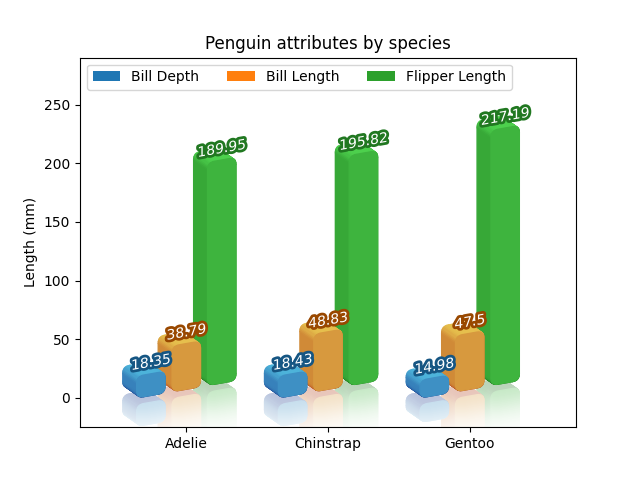
#* We start from a simple bar chart

import matplotlib.pyplot as plt
import numpy as np

fig, ax = plt.subplots(num=1, clear=True)

# We start from mpl example "Grouped bar chart with labels". The only change
# we made is to increase the offset slightly so that bars are separated.

species = ("Adelie", "Chinstrap", "Gentoo")
penguin_means = {
    'Bill Depth': (18.35, 18.43, 14.98),
    'Bill Length': (38.79, 48.83, 47.50),
    'Flipper Length': (189.95, 195.82, 217.19),
}

x = np.arange(len(species))  # the label locations
n = len(penguin_means)

space_between_species = 0.3
space_between_attributes = 0.05

bar_width = (1 - space_between_species - (n-1) * space_between_attributes) / n

offset_between_attributes = np.arange(n) * (bar_width + space_between_attributes)
label_offset = (1 - space_between_species) * 0.5

for o, (attribute, measurement) in zip(offset_between_attributes,
                                       penguin_means.items()):
    rects = ax.bar(x + o + bar_width*0.5,  # bar_width*0.5 is needed as the bar
                                           # is centered at the given position.
                   measurement, bar_width, label=attribute)
    ax.bar_label(rects, padding=3)

# Add some text for labels, title and custom x-axis tick labels, etc.
ax.set_ylabel('Length (mm)')
ax.set_title('Penguin attributes by species')
ax.set_xticks(x + label_offset, species)
ax.legend(loc='upper left', ncols=3)
ax.set_ylim(0, 250)

#* Coloring bar labels

import mpl_visual_context.patheffects as pe

# Let's start with simple patheffect, to change the color of bar labels.
# Well add patheffects so that they have similar color to the bar themselves.

def colored_thick_line(c):
    "patheffect to make thick outline with given color with lightness set at 0.3"
    return pe.GCModify(linewidth=4) | pe.StrokeColor(c) | pe.HLSModify(l=0.3)

for p, t in zip(ax.patches, ax.texts):

    t.set_path_effects([colored_thick_line(p.get_fc()),  # thick outline with
                                                         # same color as the
                                                         # bar.
                        pe.FillColor("w") # draw the text with white fill.
                        ])

#* Skewed bar charts

# We would like to make bars between different species, more distinguished.
# Let's skew the bars, but the bars of different species have different skew
# origin.

# This is a simple skew. We do this using PostAffine so that the skew is done
# in the screen coordinate.
tr_skew = pe.PostAffine().skew_deg(0, 10)

# We want the origin of the skew, for each species, set at the lower left
# corner of the left most bar. This is doen by tr_recenter.

for i in range(3):
    tr_recenter = pe.Recenter(ax, i, 0, coords="data")
    # Thi is to set the origin of the skew, which is (i, 0) in the data
    # coordinate.
    skew = tr_recenter | tr_skew | tr_recenter.restore()
    # Recenter changes ths coordindates, so in most cases, it should be resotred.

    for p, t in zip(ax.patches[i::3], ax.texts[i::3]):  # The slice is to
                                                        # select the bars (amd
                                                        # texts)in the same
                                                        # specie group.
        p.set_path_effects([skew])

        # bar labels are also being skewed. The skew is combined with coloring.
        t.set_path_effects([skew | colored_thick_line(p.get_fc()),
                            skew | pe.FillColor("w")
                            ])

# we adjust the and ylim to make a room for skewed artists.
ax.set_ylim(0, 290)

#* How about some reflection?

tr_skew = pe.PostAffine().skew_deg(0, 10)

for i in range(3):
    tr_recenter = pe.Recenter(ax, i, 0, coords="data")
    skew = tr_recenter | tr_skew | tr_recenter.restore()

    # We want to draw reflected image. This is very similar to the skew, but we
    # make the coordinates flipped in y-direction before the skew. We also like
    # to offset the bar downward by 5 points.
    skew_flipped = (tr_recenter | pe.PostAffine().scale(1, -1)
                    | tr_skew  | tr_recenter.restore() | pe.Offset(0, -5))

    for p, t in zip(ax.patches[i::3], ax.texts[i::3]):
        p.set_path_effects([skew,
                            skew_flipped | pe.GCModify(alpha=0.2)])
        # we flip the bar and also make it transparent.

        t.set_path_effects([skew | colored_thick_line(p.get_fc()),
                            skew | pe.FillColor("w")
                            ])

# Again, we adjust the ylim to better show flipped box.
ax.set_ylim(-20, 290)

#* 3D effects

# We will add 3d effects to the bars. The reflection effect won't be used for now.
from matplotlib.colors import LightSource
from mpl_poormans_3d import Poormans3d, Poormans3dFace

ls = LightSource(azdeg=170)

p3d = Poormans3d(ls, displacement=(-10, 7), fraction=0.5)
p3d_face = Poormans3dFace(ls, displacement=(0, 0), fraction=0.5)

for i in range(3):
    tr_recenter = pe.Recenter(ax, i, 0, coords="data")
    skew = tr_recenter | tr_skew | tr_recenter.restore()

    for p, t in zip(ax.patches[i::3], ax.texts[i::3]):
        p.set_path_effects([skew | p3d,
                            skew | p3d_face])
        # we flip the bar and also make it transparent.

        # t.set_path_effects([skew | colored_thick_line(p.get_fc()),
        #                     skew | pe.FillColor("w")
        #                     ])

# We adjust the zorder of the bars so that the left most bar in the same group
# is drwan last, so their overwrap looks natural.
for i in range(3):
    for z, p in enumerate(ax.patches[i::3]):
        p.set_zorder(p.get_zorder() - z*0.01)

ax.set_xlim(-0.4, 3.1)
ax.set_ylim(-25, 290)

#* make bar corners round

rc = pe.RoundCorner(5)

for i in range(3):
    tr_recenter = pe.Recenter(ax, i, 0, coords="data")
    skew = tr_recenter | tr_skew | tr_recenter.restore()

    for p, t in zip(ax.patches[i::3], ax.texts[i::3]):
        p.set_path_effects([skew | rc | p3d,
                            skew | rc | p3d_face])

#* Reflection with 3d effects : attemp 1

# We would like to add reflection effects to the bars in 3d. Unfortunately this
# is not simply doe by adjusting alpha. The 3d effects are done by draing may
# rectangles with different colors, partly overwrapping. And overwrapping
# regions will become more opaque than other regions.

# One way to overcome this to use image-clipboard to capture the bars with 3d
# effects, and apply the alpha in the image plane.

from mpl_visual_context.patheffects_image_effect import ImageClipboard
import mpl_visual_context.image_effect as ie

ic = ImageClipboard()

for i in range(3):
    tr_recenter = pe.Recenter(ax, i, 0, coords="data")
    skew = tr_recenter | tr_skew | tr_recenter.restore()

    for p in ax.patches[i::3]:
        p.set_path_effects([skew | rc | p3d | ic.copy(),
                            # copy will draw the artist in the clipboard, but
                            # not on the screen.
                            skew | rc | p3d_face | ic.copy(),
                            ic.paste(ie.AlphaAxb((0.5, 0)))
                            # paste will draw the clipboard image on the
                            # screen, optionally aplly image-effects.
                            ])

#* Reflection with 3d effects : attemp 2

# The above approch works to some degree, but can be improved.
# In the above approach, the clipboard is copied and pasted for each bar. We will collcet all the bars in the clipboard and get pasted later.

from mpl_visual_context.patheffects_image_effect import ClipboardPasteArtist

ic = ImageClipboard()

for i in range(3):
    tr_recenter = pe.Recenter(ax, i, 0, coords="data")
    skew = tr_recenter | tr_skew | tr_recenter.restore()

    for p in ax.patches[i::3]:
        p.set_path_effects([skew | rc | p3d | ic.copy(),
                            skew | rc | p3d_face | ic.copy(),
                            ])
        # without past, nothing will be drawn on screent at this stage.

a = ClipboardPasteArtist(ic, ie.AlphaAxb((0.5, 0)))
a.set_zorder(1.5)  # we need to make sure that this is drawn after the bars
                   # (i.e., they should have copied to the clipboard before
                   # getting pasted.)
ax.add_artist(a)


#* Reflection with 3d effects : attemp 3

# First we remove clipboard_paste_artists that is added previously.
for a in ax.artists: a.remove()

# We repeat above attempt, but for the flipped bars. Actually, we will use
# ArtistListWithPE (at zorder of 0.5) to capture the flipped image,
# ClipboardPasteArtist (at zorder 0.7) to paste, and draw the bars (zorder of
# 1).

from mpl_visual_context.artist_helper import ArtistListWithPE

ic_flipped = ImageClipboard()

for i in range(3):
    tr_recenter = pe.Recenter(ax, i, 0, coords="data")
    skew = tr_recenter | tr_skew | tr_recenter.restore()
    skew_flipped = (tr_recenter | pe.PostAffine().scale(1, -1)
                    | tr_skew  | tr_recenter.restore() | pe.Offset(0, -5))

    pe_flipped = [
        rc | skew_flipped | p3d | ic_flipped.copy(),
        rc | skew_flipped | p3d_face | ic_flipped.copy()
    ]

    a_flipped = ArtistListWithPE(ax.patches[i::3], pe_flipped)
    a_flipped.set_zorder(0.5)
    ax.add_artist(a_flipped)

    # The original bars will be drawn with 3d effects.
    for p in ax.patches[i::3]:
        p.set_path_effects([skew | rc | p3d,
                            skew | rc | p3d_face,
                            ])

a = ClipboardPasteArtist(ic_flipped, ie.AlphaAxb((0.3, 0)))
a.set_zorder(0.7)
ax.add_artist(a)

#* Reflection with 3d effects : attemp 4

for a in ax.artists: a.remove()

# Refelction artist is similar to ClipboardPasteArtist, but is specialized to
# draw refelection images which fades out away from the original image. This
# requires two clipboard, one for reflected, the other for the original.

from mpl_visual_context.patheffects_image_effect import ReflectionArtist

ic= ImageClipboard()
ic_flipped = ImageClipboard()

for i in range(3):
    tr_recenter = pe.Recenter(ax, i, 0, coords="data")
    skew = tr_recenter | tr_skew | tr_recenter.restore()
    skew_flipped = (tr_recenter | pe.PostAffine().scale(1, -1)
                    | tr_skew  | tr_recenter.restore() | pe.Offset(0, -5))

    pe_reflection = [
        rc | skew_flipped | p3d | ic_flipped.copy(),
        rc | skew_flipped | p3d_face | ic_flipped.copy(),
        rc | skew | p3d | ic.copy(),
        rc | skew | p3d_face | ic.copy()
    ]

    a_flipped = ArtistListWithPE(ax.patches[i::3], pe_reflection)
    a_flipped.set_zorder(0.5)
    ax.add_artist(a_flipped) # note again that this won't draw anything on the
                             # screen, only in the clipboard.

    # We draw the original bars will be drawn with 3d effects. For the agg
    # backend, we may past the content of the ic. But for pdf backend, this may
    # be better as it produces vector output.
    for p in ax.patches[i::3]:
        p.set_path_effects([skew | rc | p3d,
                            skew | rc | p3d_face,
                            ])

a = ReflectionArtist(ic_flipped, clipboard_alpha=ic,
                     alpha_dist_sigma=20, # image will become transparent about
                                          # 20 points away from the originl
                                          # imge.
                     clear_alpha=True # make sure that clipboard_alpha is cleared after use.
                     )
a.set_zorder(0.7)
ax.add_artist(a)

#* Reflection with 3d effects : attemp 4

plt.show()
Total running time of the script: (0 minutes 0.581 seconds)